Set up your device
You set up a GridWatchdog from your phone, over a WiFi network the unit makes itself. You don’t need your home WiFi, and you don’t need an app.
Set up your device
Section titled “Set up your device”-
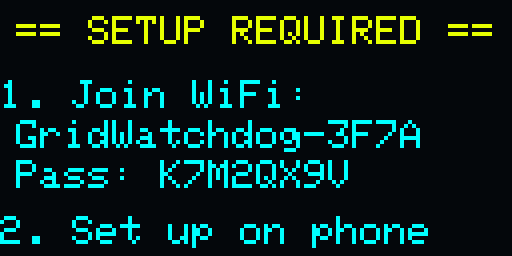
Plug it in. Use an outlet in the place you want to watch. The screen shows SETUP REQUIRED, the name of the unit’s WiFi network (it starts with GridWatchdog-) and its password. The same name and password are printed on the label.
-
Join that WiFi network on your phone. On an iPhone, the setup page usually opens by itself. If it doesn’t, open your browser and go to 192.168.4.1.
-
Give the unit a name, such as Kitchen or Garage. The name appears in every email it sends you.
-
Enter the email address you want alerts sent to.
-
Check the signal. The setup page shows the cellular signal where the unit is: Good, Fair or Weak. If it says Weak or No signal, see Where to put it before you go on.
-
Select Activate GridWatchdog. Activating can take a few minutes, because the unit connects over the cellular network while you wait. Keep your phone on the unit’s WiFi until the page says Activated!
-
Send a test alert. Select Send Test Alert on the same page, then check your inbox for an email with Test Alert in its subject.
You can then disconnect your phone. The unit’s setup WiFi turns itself off 15 minutes after you disconnect. That’s normal, and the unit keeps watching your power. To turn the WiFi back on, see The button.
If activation fails, the page tells you why. See Setup problems.
Confirm your email
Section titled “Confirm your email”When the unit is activated, we email you. The subject ends in Activated, and the email has a Confirm my email button. Select it.
Until you do, the unit’s screen shows Confirm email. After you confirm, that line goes away and a small check mark appears in the top corner of the screen the next time the unit checks in with us.
Your unit sends outage alerts whether or not you’ve confirmed. Confirming tells us our emails reach you. If you haven’t confirmed after a few days, we send you a reminder called Confirm your GridWatchdog email. Signing in to your account also confirms your address; see Signing in.
Where to put it
Section titled “Where to put it”- Plug your appliance into it. The unit has a built-in outlet, rated 15 A like a standard wall outlet. Plug the unit into the wall, then plug the appliance you want to keep an eye on, such as your freezer, into the unit. It watches the power at that exact outlet.
- Use an outlet that’s always on. Don’t use an outlet controlled by a wall switch, or a battery backup (UPS). Turning a switched outlet off looks like a power outage, and a battery backup hides a real one.
- Give it a cellular signal. Signal is weakest in basements, inside metal cabinets and behind large appliances. A spot near a window or higher up is usually better. The setup page shows the signal before you activate, so you can try a few spots first.
After setup, your account page shows the last signal reading we received.
Several devices
Section titled “Several devices”Set each unit up on its own, one at a time. Each unit has its own WiFi network and password, printed on its own label.
- Give each unit a different name, so you can tell their emails apart.
- If you use the same email address for all of them, they all appear on one account page. See Several units on one address.